 CARTANO
Canvases · TOGAF
A TOGAF tool for capabilities, roadmap and decisions
Cartano does not draw the TOGAF ADM cycle: it tools its deliverables. The capability map matches phase B, the plateau roadmap phases E and F, and the Application canvas applies TOGAF-style viewpoints. The decision log keeps the trade-offs. Cartano is not TOGAF certified, and does not claim to be.
TOGAF, ArchiMate and what a tool can do with them
TOGAF is an enterprise architecture method from The Open Group. Its ADM (Architecture Development Method) chains a preliminary phase, then phases A to H, around requirements management. It says what to do and in which order, not how to draw.
ArchiMate is a modelling language. The two combine: TOGAF organises the approach, ArchiMate draws the architectures. A tool is mostly useful for keeping the deliverables the approach produces.
What Cartano tools, phase by phase
Three canvases carry a TOGAF reference in their notation:
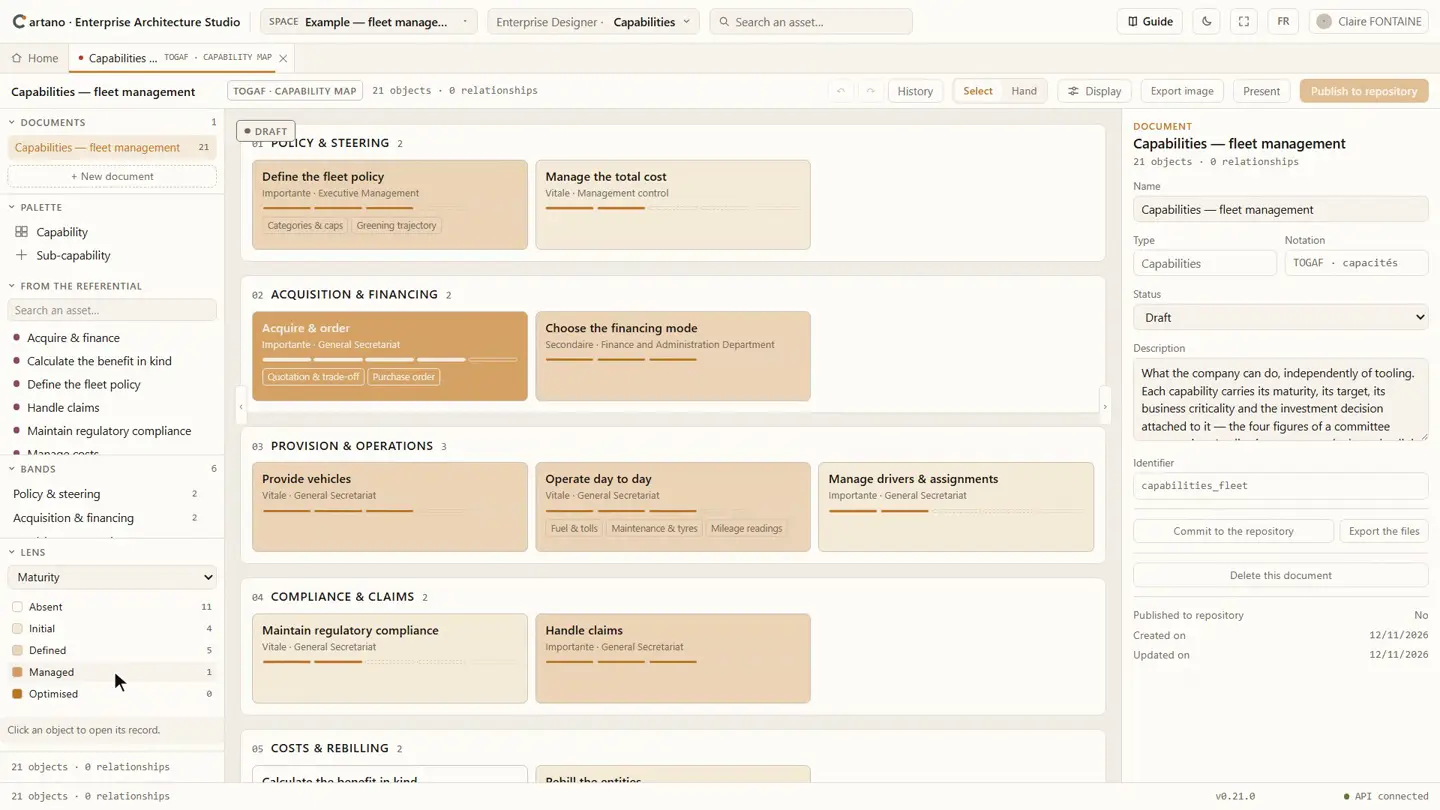
- Capabilities (“TOGAF · phase B”): the business capability map, with maturity, target, criticality and supporting applications;
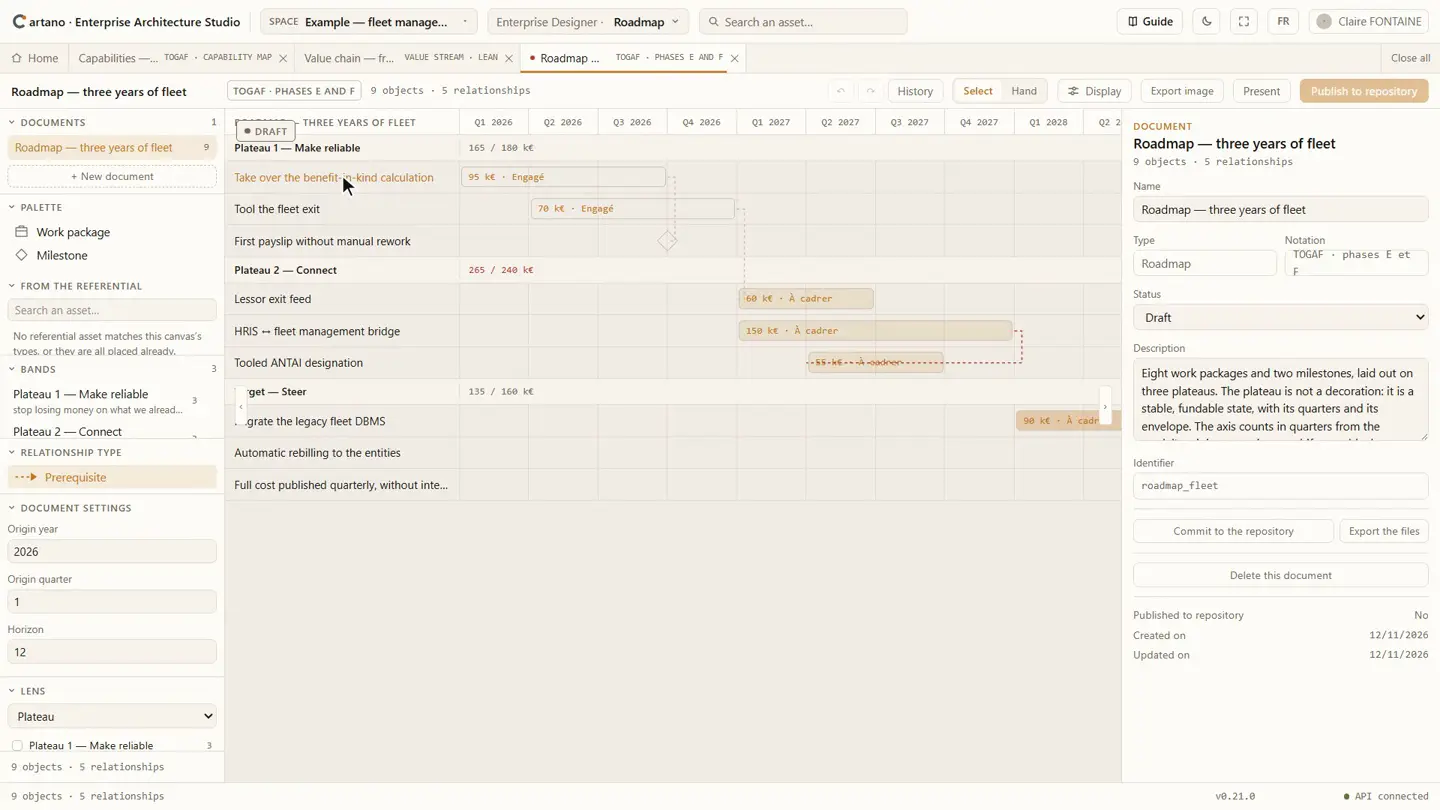
- Roadmap (“TOGAF · phases E and F”): plateaus, work packages, milestones and prerequisites, on a quarterly axis;
- Application: five TOGAF-style viewpoints (complete view, application cooperation, application usage, application structure, infrastructure) that filter the view without removing anything from the model.
A roadmap that checks itself
A plateau is a stable, fundable state: it has a start, an end and an envelope in k€. The roadmap refuses, as errors, a package that overruns its plateau or has none, a package that starts before its prerequisite is finished, and a plateau whose cumulative budget exceeds the envelope. Four lenses colour the view: plateau, risk, status, budget.
The decision log completes the phase with an ADR register: each decision cites its alternatives and consequences, and a hard-to-reverse decision that considered no alternative is refused. The technology radar and the portfolio point back to it.
Linking capabilities and applications
Each capability cites, in the “Supporting applications” field, applications from the repository: the map counts those links and refuses a vital capability that nobody supports. The same applications show up in the Application view, the urbanisation plan and the portfolio, without being re-keyed.
Frequently asked questions
What is the TOGAF ADM cycle?
The ADM (Architecture Development Method) is the TOGAF cycle: a preliminary phase, then phases A (vision) to H (change management), with requirements management at the centre. Each phase produces architecture deliverables.
TOGAF or ArchiMate?
They do not answer the same question. TOGAF is a method; ArchiMate is a modelling language. They combine, and Cartano applies TOGAF-style viewpoints to its ArchiMate views.
Which TOGAF deliverables can I produce?
A capability map (phase B), a value stream, a plateau roadmap (phases E and F), an architecture decision log, and application views filtered by viewpoint. Each canvas is checked and exports as an image.
Is Cartano TOGAF certified?
No, and it does not claim to be. What is true: the Capabilities and Roadmap canvases are aligned with phases B, E and F, and the Application view offers TOGAF-style viewpoints.
Do I need a certification to use the tool?
No. No TOGAF certification is required to use Cartano: the canvases can be picked up without knowing the ADM cycle, which remains useful for knowing what to produce.
How do I link capabilities and applications?
Through each capability's “Supporting applications” field, which cites repository applications. They show up in the Application view and the urbanisation plan without being re-keyed.
Watch it run, rather than read about it.
A 30-day trial with no credit card on the Solo and Atelier plans. Or thirty minutes of demo, on your own cases.