 CARTANO
Canvases · Capability map · TOGAF phase B
A business capability map that shows where to invest
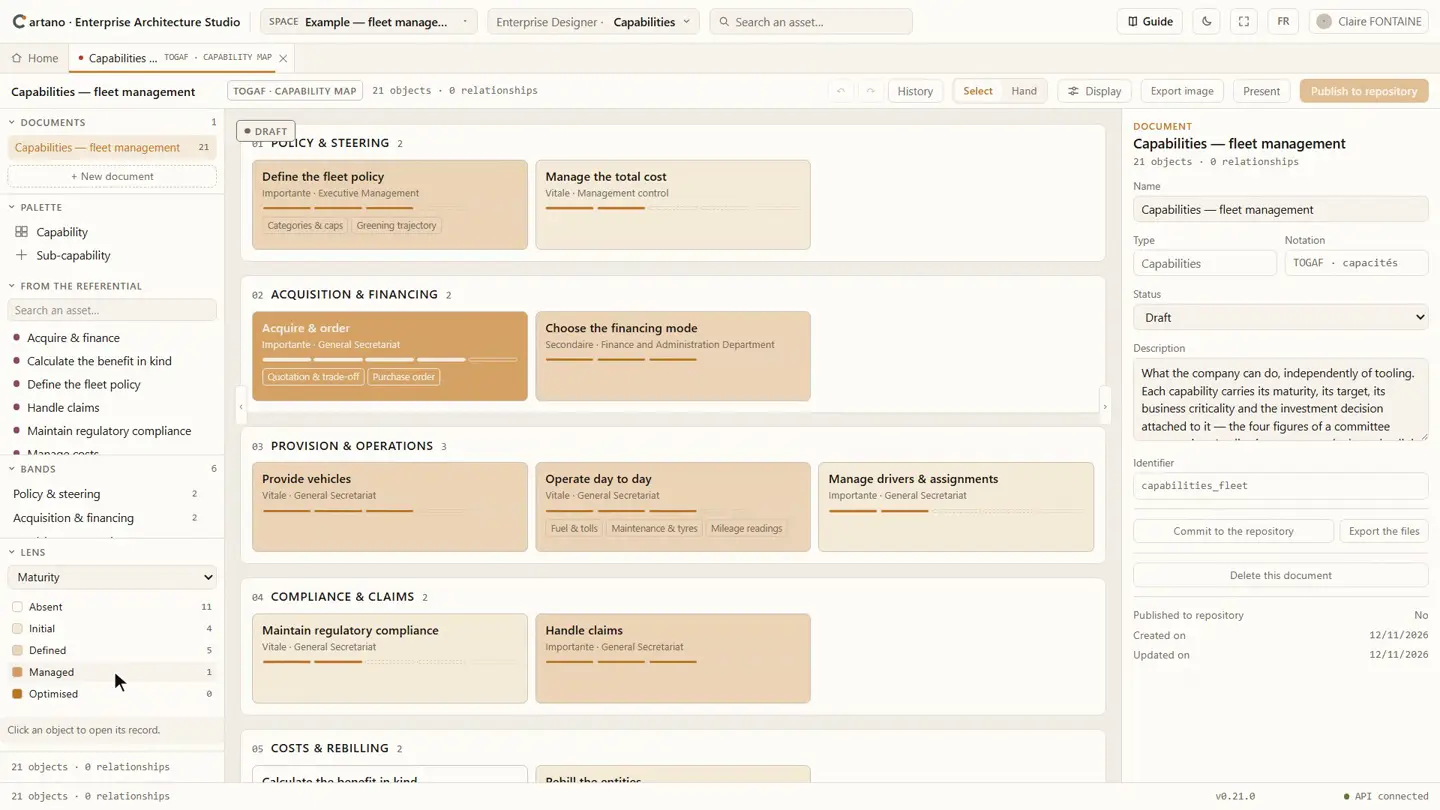
The Cartano Capabilities canvas arranges what the company can do by domain. Each capability carries its maturity, its target, its criticality and the investment decision attached to it, and five lenses colour the map so you can read the gaps at a glance. A vital capability that no application supports is flagged as an error.
What a capability map settles
A business capability is what the company can do, regardless of tooling: “handle claims”, “maintain regulatory compliance”. The capability map arranges them by domain and answers the underlying question: where to invest first.
It differs from a process map. A process chains activities over time; a capability describes a lasting ability that several processes can use. TOGAF phase B (business architecture) makes it a classic deliverable.
How it works in Cartano
The map is made of domains (bands you name), capabilities and sub-capabilities, the latter shown in their capability's tile. No link is drawn between capabilities: one capability does not call another. Each capability carries:
maturity from 1 (absent) to 5 (optimised), the target, business criticality (vital, important, secondary), the investment decision (invest, maintain, rationalise, retire), an owner and the supporting applications chosen from the repository. Five lenses colour the map:
- maturity;
- gap to target;
- business criticality;
- application coverage, meaning the number of supporting applications;
- the investment decision.
What Cartano checks
Two checks are errors, which block publication: a vital capability that no application supports, and a capability placed in no domain. Two others are warnings: a gap of three levels or more between maturity and target, and a capability with no owner.
Linking capabilities and applications is done in the capability's sheet, through the “Supporting applications” field: you cite repository applications there, never retyped names. That link is what the application-coverage lens counts.
What comes out
The map exports as an image (PNG or SVG) and the document can be committed to a Git repository, as readable JSON files. The map, the value stream, the processes and the applications share the same repository: a capability named once shows up everywhere.
Frequently asked questions
What is a business capability?
It is what the organisation can do to fulfil its mission, regardless of the tools and teams involved: “manage claims”, “maintain regulatory compliance”. It is described by its maturity, its criticality and the investment decision attached to it.
What is the difference between a capability map and a process map?
A process chains activities over time, with actors and decisions. A capability is a stable ability that several processes use. A capability map is for arbitrating investments; a process map, for understanding how something runs.
How do I colour the map (maturity, cost, criticality)?
With the lens selector: maturity, gap to target, business criticality, application coverage or investment decision. There is no “cost” lens in this canvas; running cost is read in the Portfolio canvas.
How do I link capabilities and applications?
Through the capability's “Supporting applications” field, which cites repository applications. The application-coverage lens counts those links, and a vital capability with no application is refused.
Is there a ready-made template?
No, there is no industry library: you start from your own taxonomy. Cartano offers six domains at creation, which you rename as you like, and a demo example to see how it works.
Capability or value stream?
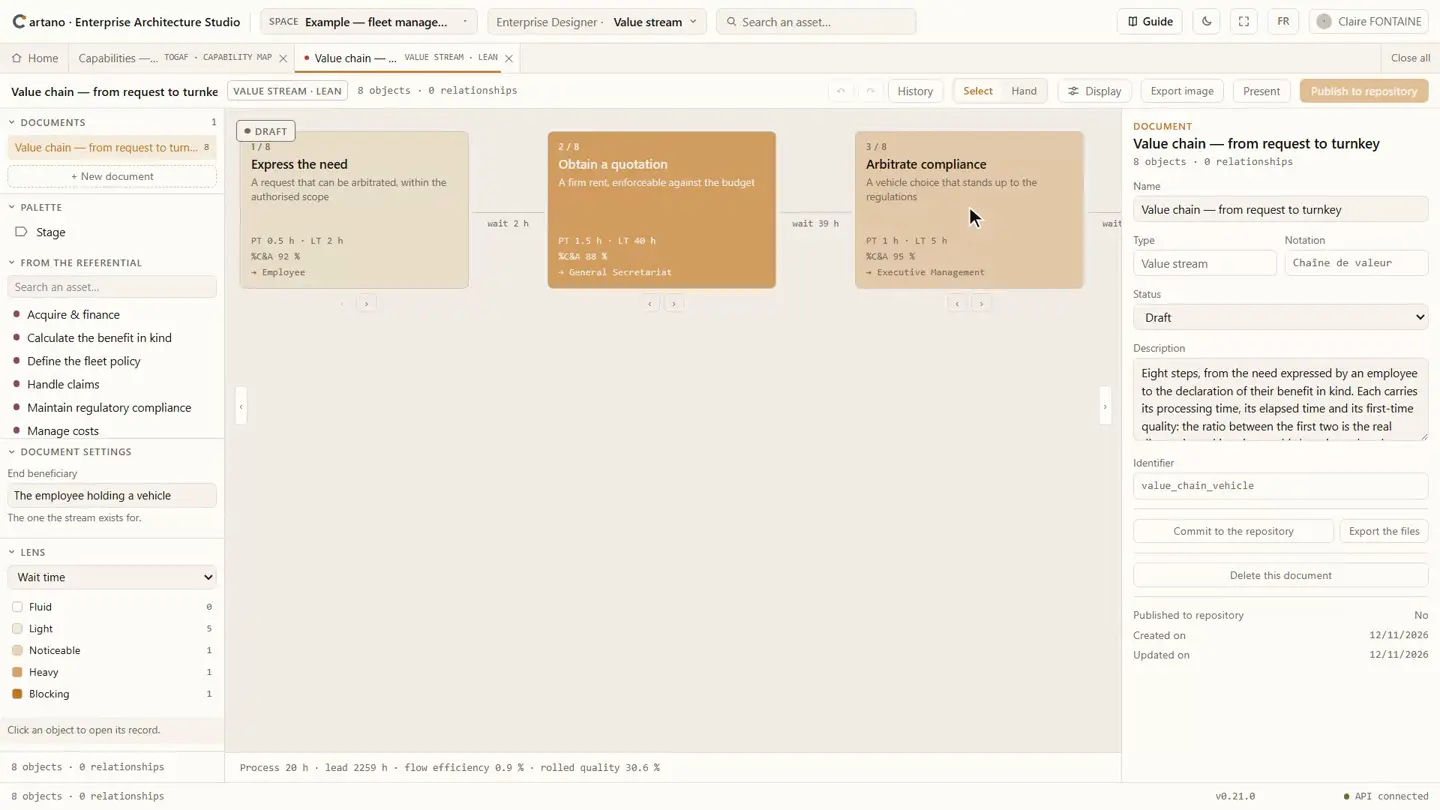
A capability says what you can do; a value stream says how value reaches the beneficiary, stage by stage, with processing time, elapsed time and first-pass quality. Cartano offers both, and each stage cites the capabilities it uses.
Watch it run, rather than read about it.
A 30-day trial with no credit card on the Solo and Atelier plans. Or thirty minutes of demo, on your own cases.