 CARTANO
Canvases · ArchiMate 3.2
An online ArchiMate tool that reviews your model
Cartano is an ArchiMate 3.2 modeling tool that runs in your browser, with nothing to install: Business, Application and Technology layers, viewpoints, relationships. As you draw, it reviews the model and flags what does not hold, such as a serving link that runs down a layer or an element with no relationship at all.
What ArchiMate settles
ArchiMate describes an enterprise in three stacked layers: Business, Application and Technology. It answers precise questions: which process stops if this application goes down, which server it runs on, who answers for it.
Those answers only hold if relationships mean something. In ArchiMate a serving or realization relationship has a direction, and the standard says which one is allowed. That is what separates a model from a drawing.
How it works in Cartano
The Application canvas stacks the three layers. It offers nine element types and seven relationships. The layer is a property of the type: an element does not change layer because you move it, it changes layer when you retype it.
TOGAF-style viewpoints filter the view without removing anything from the model. Five are offered, from the complete view to infrastructure. Other canvases complete the notation:
- Technology: network zones and components, where you drop an object sets its band;
- Motivation: stakeholders, drivers, goals and requirements;
- Organisation: the tree of entities and roles, derived from the repository;
- Application data flows: nested blocks and typed flows;
- Risk register, also in ArchiMate.
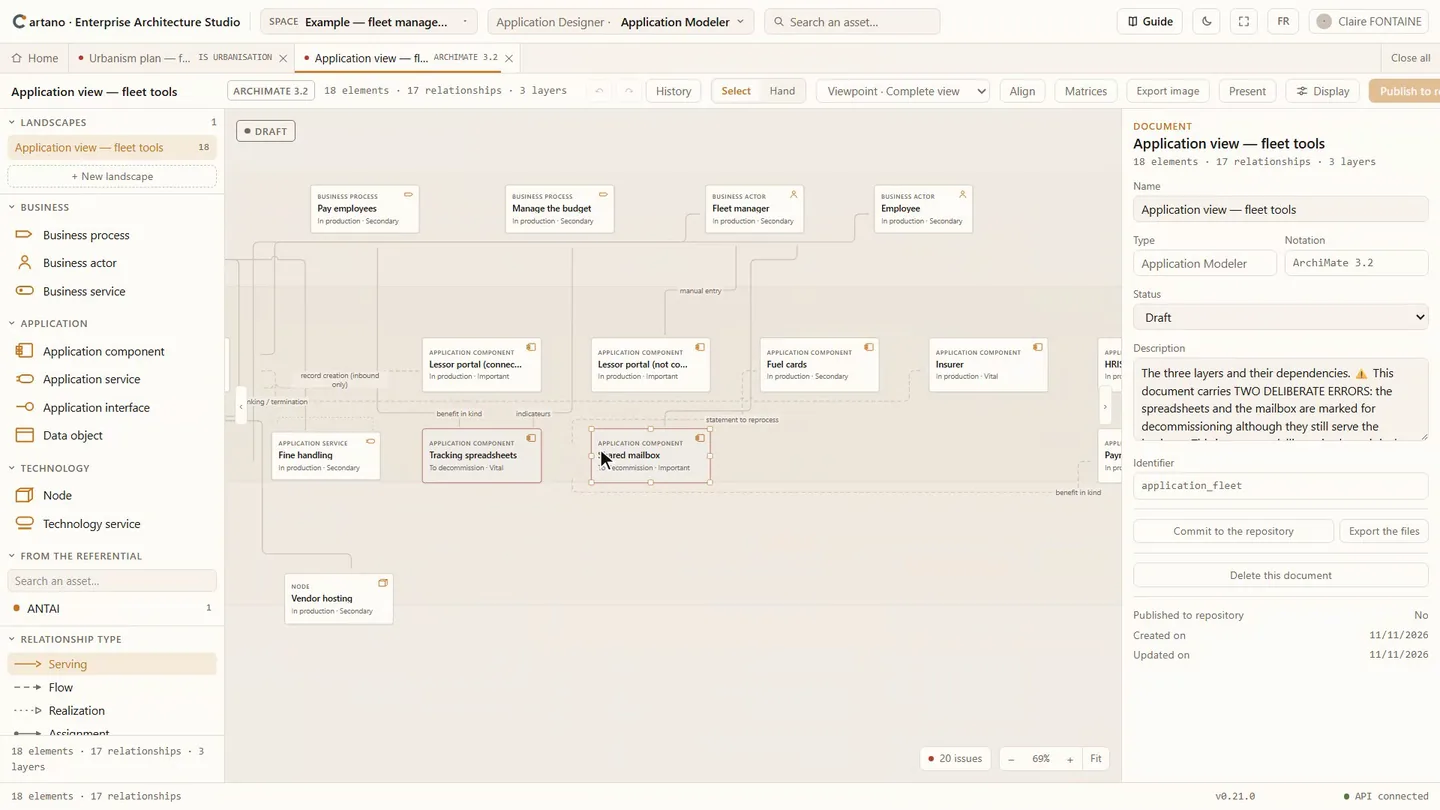
What Cartano checks as you draw
The model is reviewed every time it is read, and each issue disappears as soon as you fix it. On the Application view, these are flagged as errors:
- an element with no relationship;
- a serving link that runs from a higher layer down to a lower one, when in ArchiMate technology serves application, which serves the business;
- an application marked for decommissioning that still serves the business layer.
Three other checks are warnings: an application component that realizes no service, a data object that no application accesses, an element with no owner.
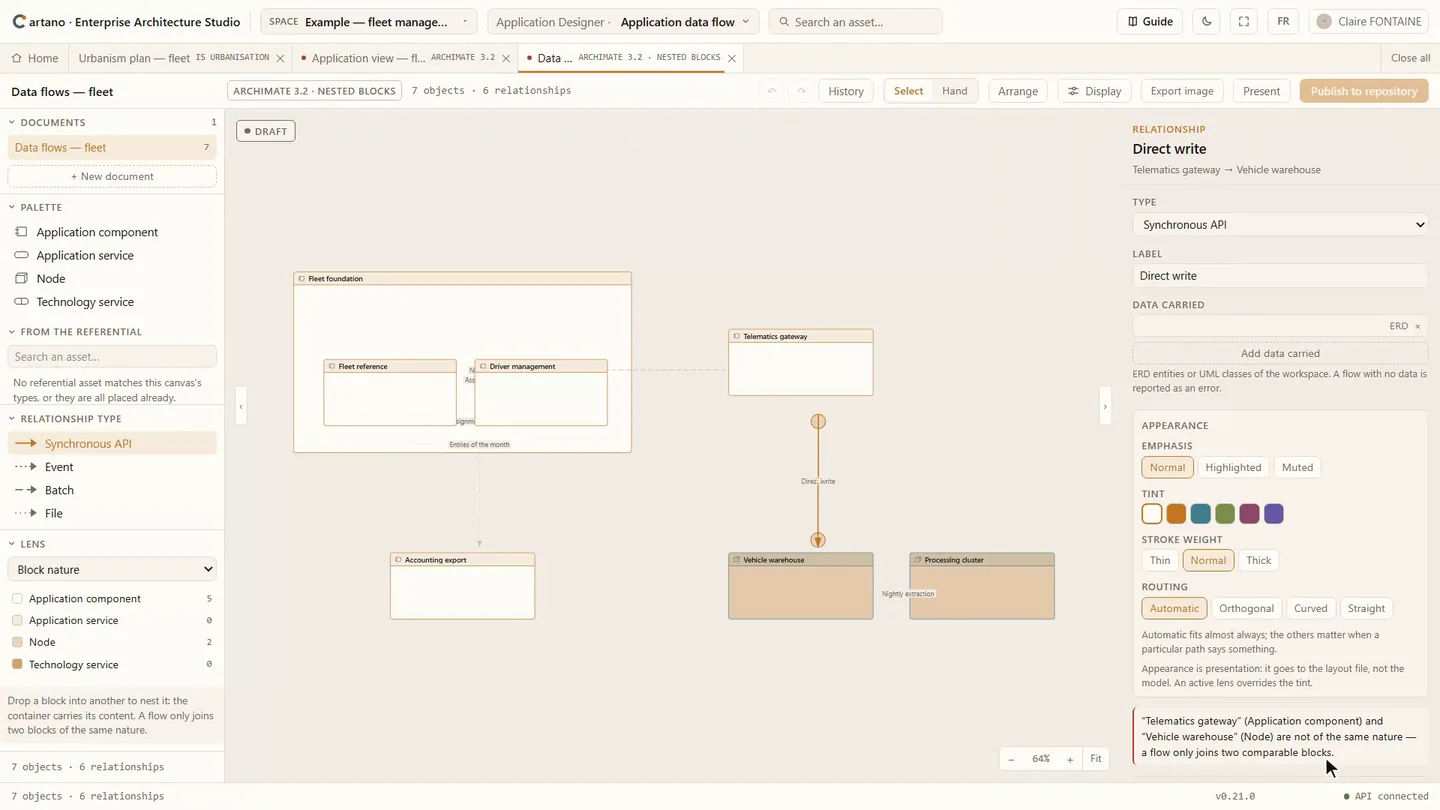
What comes out
Each view exports as an image, in PNG or SVG. Each document can also be committed to a Git repository, and the whole workspace exports as files in open formats: you are not locked into a model.
The same elements live in the repository: an application described once shows up in the application view, the capability map and the roadmap, without being re-keyed.
Frequently asked questions
What is ArchiMate and what is it for?
ArchiMate is the enterprise architecture modeling language of The Open Group. It describes an organisation in layers (Business, Application, Technology) and the relationships between their elements, to answer questions like “what depends on what?” or “what breaks if this server goes down?”.
Which version of ArchiMate does Cartano follow?
ArchiMate 3.2. The Application canvas offers a subset: nine element types and seven relationships.
Is there a free ArchiMate tool?
Yes, Archi is a free, open-source desktop application dedicated to ArchiMate. Cartano is an online tool: a 30-day trial with no credit card, then the Solo plan at 12 € excl. VAT per year for one author.
ArchiMate or TOGAF: what is the difference?
They do not answer the same question. TOGAF is a method, with its ADM cycle; ArchiMate is a modeling language. The two combine, and Cartano applies TOGAF-style viewpoints to its ArchiMate views.
ArchiMate or C4: which should I choose?
ArchiMate describes the whole enterprise, from business to infrastructure. C4 describes a piece of software at several scales, from context to components. Cartano offers both in the same repository: see the C4 model online.
Can I import an existing file?
Cartano takes draw.io drawings, Hackolade models, and CSV or JSON files for the repository. The ArchiMate Exchange Format is not supported for now.
Watch it run, rather than read about it.
A 30-day trial with no credit card on the Solo and Atelier plans. Or thirty minutes of demo, on your own cases.