 CARTANO
Canvases · Technology radar
A technology radar where every position cites its decision
The Cartano Radar canvas draws four quadrants and four rings, and nobody drags a dot by hand: the position comes from the quadrant and ring you choose, and each item points to the decision-log entry that put it there. A technology to contain or retire that stays in use without a dated waiver is flagged as an error, and the error blocks publication.
What a technology radar settles
A technology radar sorts what the company uses (languages, tools, platforms, techniques) by the stance it takes: adopt, trial, contain, retire. It answers a simple question: what are we betting on, and what are we moving away from?
The usual risk is a radar that says one thing while projects do another. In Cartano the radar is a control as much as a drawing.
How it works in Cartano
The 4 × 4 radar canvas has four quadrants (Techniques, Tools, Platforms, Languages & frameworks) and four rings, from the centre outward: Adopt, Trial, Contain, Retire. There is nothing to drag: the position is derived from the quadrant and the ring.
Each item carries a few fields:
- the founding ADR, picked from the decision log and never typed by hand;
- real usage: None, Pilot, Active or Widespread;
- a waiver and its end date, when you keep in use what you decided to contain or retire;
- an owner, and the applications from the repository that use it.
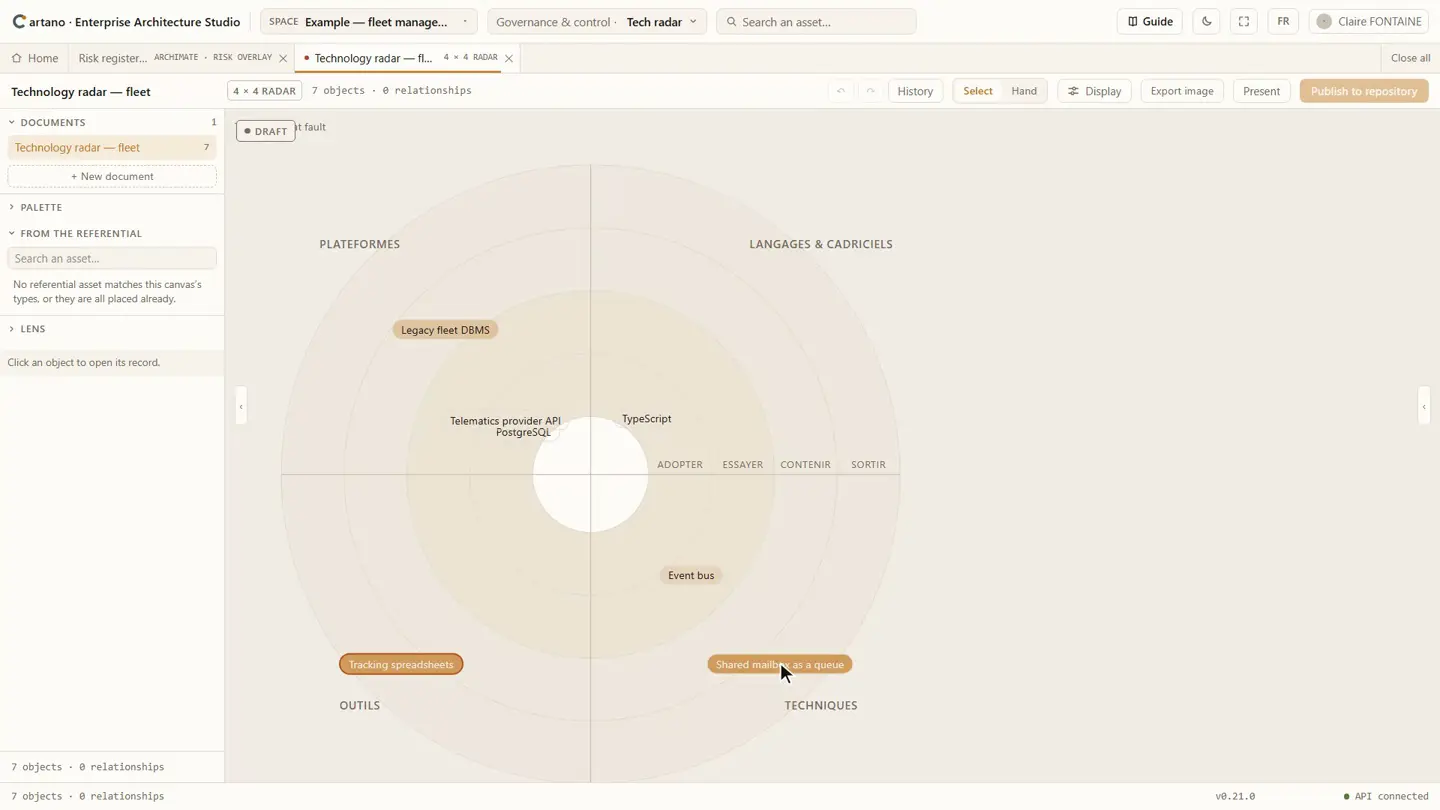
What Cartano refuses
The central rule is written into the canvas: an item on the Contain or Retire ring whose usage is Active or Widespread must have a waiver in force. A waiver with no end date is not a waiver.
That rule is an error (it blocks publishing the document); others are warnings:
- error: an item to contain or retire is still in use with no waiver in force;
- warning: a waiver that has expired, or has no end date;
- warning: an item to adopt, contain or retire that cites no decision;
- warning: an adopted item whose usage is “None”, or a trial item already widespread.
The decision log follows the same logic: a hard-to-reverse decision that considered no alternative is refused, and so is a decision that entails no documented consequence.
Who feeds it, and what comes out
The radar is kept by hand: the architecture team enters the items, picks the decision-log entries and links the repository applications. Nothing fills it in on its own, and Cartano does not inventory your technologies.
The radar exports as an image (PNG or SVG). The document can also be committed to a Git repository, as readable JSON files that diff from one version to the next.
Frequently asked questions
What is a technology radar?
A circular chart that sorts an organisation's technologies by quadrant (the kind of technology) and by ring (the stance taken: adopt, trial, contain, retire). It makes a technical strategy visible so teams can discuss and follow it.
Which quadrants and rings does Cartano offer?
Four quadrants (Techniques, Tools, Platforms, Languages and frameworks) and four rings, from the inside out: Adopt, Trial, Contain, Retire.
How do you decide a technology should be retired?
Cartano does not decide for you: it asks that the decision be made and cited. The item carries the decision-log ADR that put it on the Retire ring, and while it stays in use it needs a dated waiver.
How do I link the radar and the decision log?
Each item has a “Founding ADR” field picked from the decision log of the same workspace. It does not accept free text, so a radar position always points to an identifiable decision.
Is there a free technology radar template?
Yes, free templates exist in spreadsheets and drawing tools. The difference with Cartano is the check: here a technology to retire that stays in use without a waiver is flagged as an error. 30-day trial with no credit card, then the Solo plan at 12 € excl. VAT per year.
Who feeds the radar in the team?
The authors of the workspace, by hand. Each item has an owner, and readers, who are unlimited, view the radar without using a licence.
Watch it run, rather than read about it.
A 30-day trial with no credit card on the Solo and Atelier plans. Or thirty minutes of demo, on your own cases.