 CARTANO
Canvases · Risk register
A risk register that calculates residual risk
The Cartano risk register is not a table to fill in: you draw the chain from source to event, consequence and control, and the residual risk is calculated. It depends on each control's effectiveness and implementation state, it is compared with the appetite your organisation declared, and a risk above that appetite with no control at all blocks publication.
What a risk register must allow
An IT risk register lists what can go wrong with the information system, what it would cost, and what is done to prevent it. Its value rests on one question: once the controls are in place, is the remaining risk acceptable?
In a spreadsheet, residual risk is a column you fill in. A control that is announced and one that is verified weigh the same. In Cartano, it is calculated.
How it works in Cartano
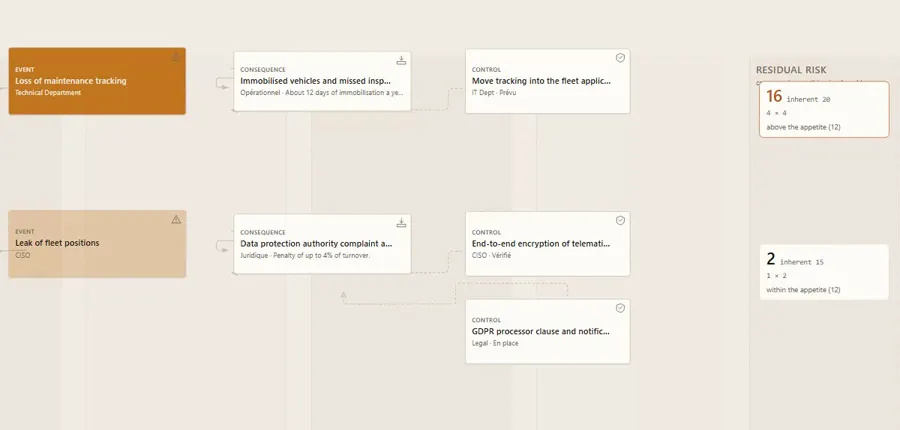
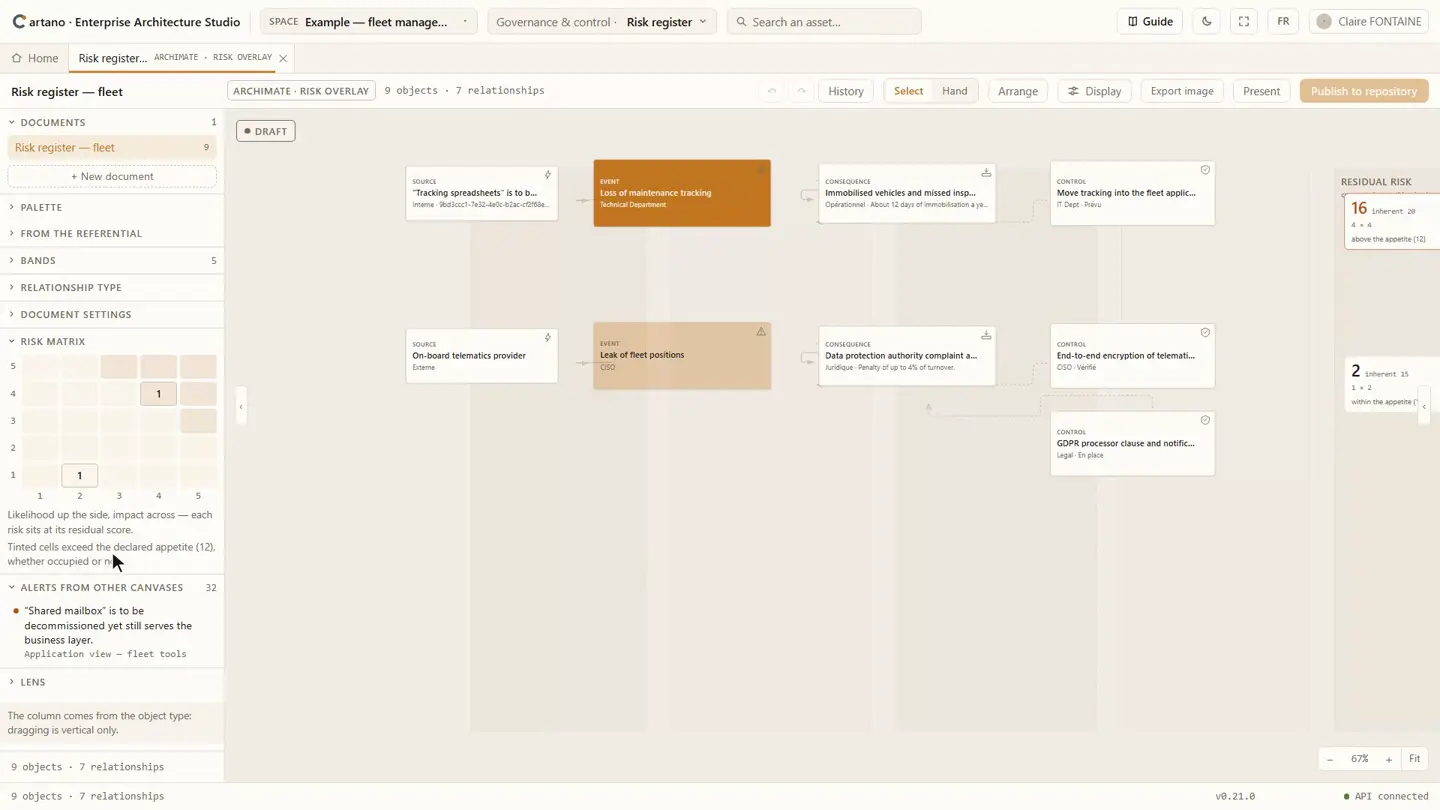
The Risk register canvas has five columns: Sources, Events, Consequences, Controls and Residual risk. The fifth accepts no object: it is calculated. An object's column comes from its type, not from where you drop it.
You enter a likelihood and an impact from 1 to 5 on the event. Each control carries an effectiveness (a percentage) and an implementation state, and the state sets its weight:
- Planned: 0.2, one fifth;
- In progress: 0.5;
- In place: 0.9;
- Verified: 1.
The calculation, and what is refused
A control on the event lowers the likelihood; a control on a consequence lowers the impact. Several controls combine rather than add, so they never reach more than 100% reduction, and risk never drops to zero. The residual score is the residual likelihood times the residual impact, from 1 to 25.
Appetite is a document setting, from 1 to 25 (12 by default), declared by the organisation. Two rules block publication:
- an event that entails no consequence;
- a risk whose residual score exceeds the appetite while no control mitigates it.
A risk above the appetite that has at least one control is not refused: it is flagged as a warning, so you look at the control that lacks effectiveness or implementation. A control announced as very effective but only planned is flagged too.
Linking risks, controls and applications
The event cites the applications and assets of the repository that it exposes: the register does not sit apart from the rest of the architecture. It can also take an issue from another canvas as a source (technology, application, value stream, work packages). The source you register then becomes an object of yours, with no automatic update.
The register exports as an image (PNG or SVG), and the document can be committed to a Git repository, as readable JSON files.
Frequently asked questions
What is an IT risk register?
It is the up-to-date list of events that can affect the information system, with their origin, their consequences and the controls that reduce them. It helps decide which risks to treat first.
How do you calculate residual risk?
In Cartano, raw risk is likelihood times impact (1 to 5 each). Each control lowers the likelihood or the impact according to its effectiveness and implementation state; several controls combine without exceeding 100%. Residual risk is the product of the two reduced values.
What weight should a merely planned control get?
One fifth: a planned control counts for 0.2 of its effectiveness, against 0.5 in progress, 0.9 in place and 1 verified.
What is risk appetite?
It is the residual score above which the organisation decides a risk must be treated. In Cartano it is a document setting, from 1 to 25, set to 12 by default; matrix cells that exceed it are tinted.
Can I link risks, controls and applications?
Yes. Controls attach to an event or a consequence, and the event cites the repository assets it exposes, applications included.
Is there an Excel template?
No. Cartano is not a template: it calculates residual risk, compares it with the appetite and refuses a risk above that appetite with no control. 30-day trial with no credit card, then the Solo plan at 12 € excl. VAT per year.
Watch it run, rather than read about it.
A 30-day trial with no credit card on the Solo and Atelier plans. Or thirty minutes of demo, on your own cases.