 CARTANO
Canvases · BPMN 2.0
Model a BPMN process online, tied to your applications
The Cartano Process Modeler draws a BPMN 2.0 process in lanes, in your browser, and refuses the flows the standard forbids. Each activity can cite the applications that support it and the data it reads or produces; calculated matrices show the gaps. The BPMN XML exports. The level is descriptive: Cartano does not execute processes.
What a BPMN process settles
BPMN 2.0 is the standard notation for business processes: who does what, in which order, with which decisions. It reads without training and helps people agree on how things work before tooling them.
A stand-alone process drawing ages fast. Tied to the company's applications and data, it answers more useful questions: which application supports this activity, which data is read without ever being produced.
How it works in Cartano
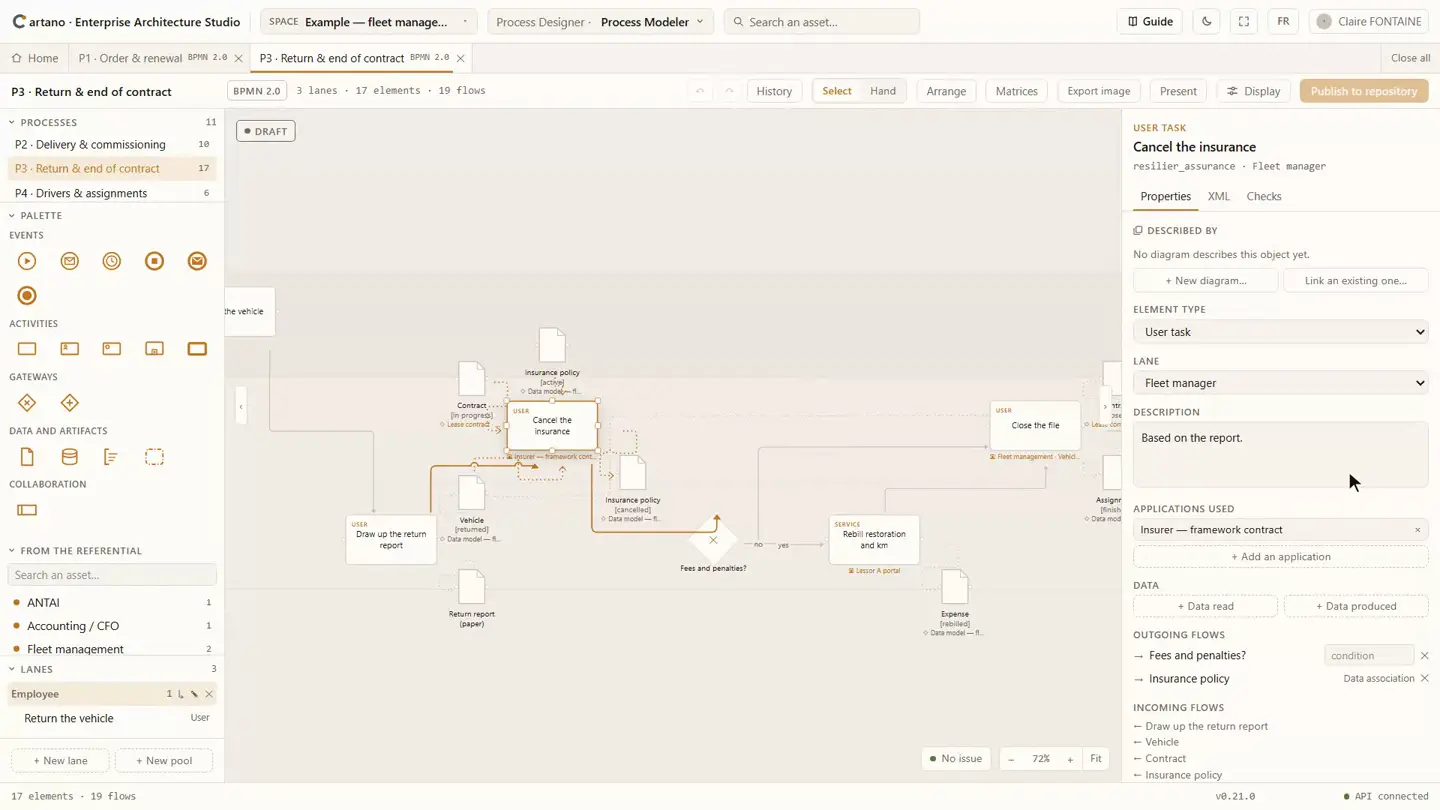
The palette has eighteen elements: start and end events (plain, message, timer, terminate), tasks (plain, user, service), sub-process, call activity, exclusive and parallel gateways, data objects and stores, annotations, groups and participants. Lanes sit in pools, with sub-lanes possible.
The flow type (sequence, message, association, data) is derived from the two ends, and a flow the standard forbids is refused: a sequence does not cross two pools, a message joins two different pools. An activity carries, in its sheet:
- the applications used, chosen from the repository;
- the data read and the data produced, which point to an entity of the data model or to a UML class;
- its incoming and outgoing flows, with the condition on a gateway branch.
What Cartano checks, and the matrices
The canvas flags as errors a forbidden flow, a process with no start or no end, an unreachable element or dead end, and a call activity with no target. It warns about a gateway with a single branch, an outgoing gateway flow with no condition, an empty sub-process.
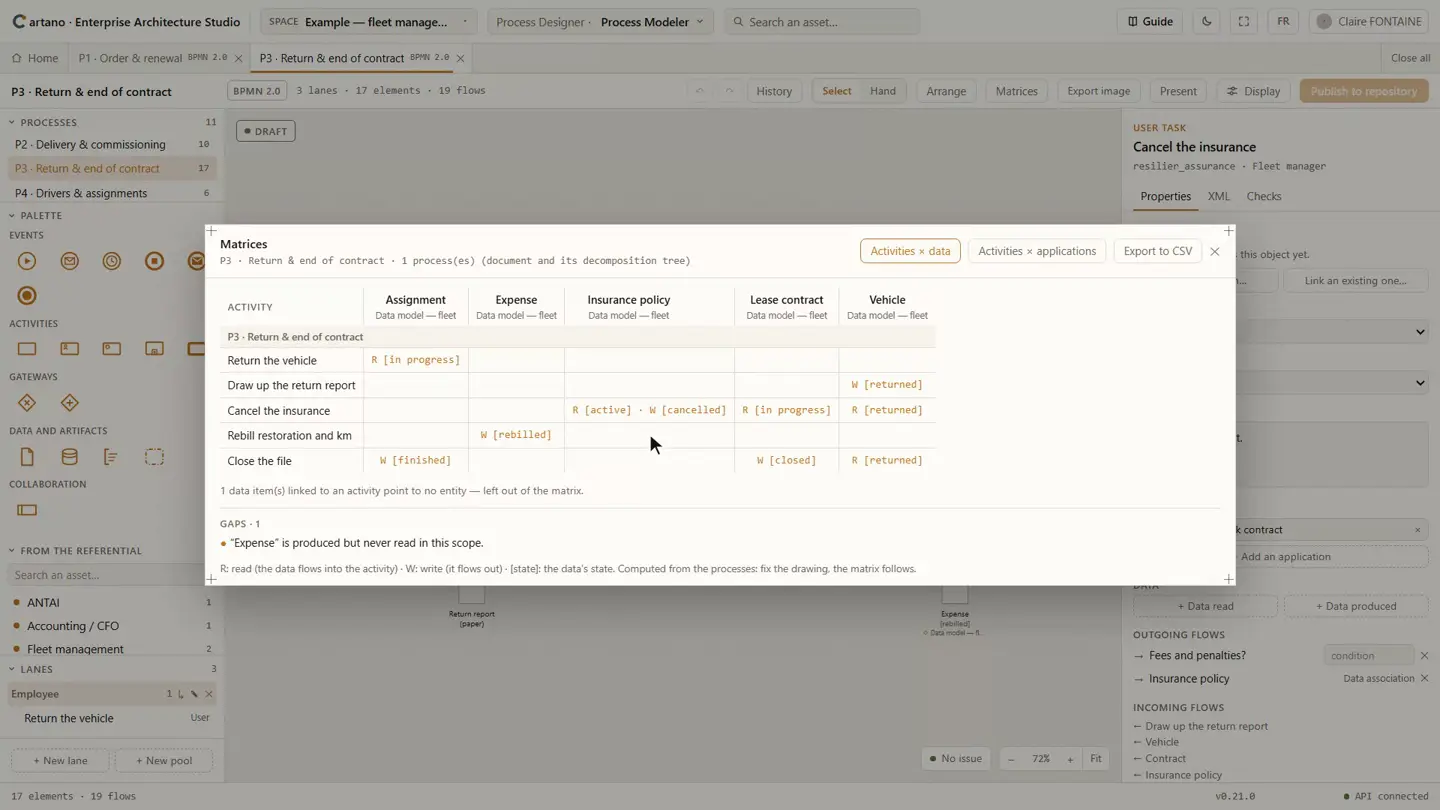
Two matrices are calculated from the processes, with nothing to enter: activities × data (read, write, state of the data) and activities × applications. They list the gaps: data produced but never read, read but never produced, an activity that no application supports.
The BPMN XML, and what comes out
The diagram exports as a .bpmn file: the process semantics and the drawing (positions, sizes, attach points). In Cartano's tests the XML is checked against the official BPMN 2.0 XSD schema.
Each process also exports as an image (PNG or SVG), and can be committed to a Git repository. On the Studio plan, an agent drafts a process from a plain-language need; you review it, and accept or refuse.
Frequently asked questions
What is BPMN 2.0?
BPMN (Business Process Model and Notation) is the standard graphical notation, maintained by the OMG, for describing business processes: events, activities, gateways and flows, split into lanes of responsibility. Version 2.0 dates from 2011 and also defines an XML interchange format.
Can I export to BPMN XML?
Yes: the “Download .bpmn” button produces a file with the process semantics and its drawing. The format is checked against the official BPMN 2.0 XSD schema in Cartano's tests.
Does Cartano execute processes?
No. The level is descriptive: you model, check and document, but there is no engine and no simulation. The export in fact marks the process as non-executable.
How do I attach an application or data to an activity?
In the activity's sheet: “Add an application” picks an application from the repository, “Data read” and “Data produced” cite an entity of the data model or a UML class. The matrices that follow are calculated on their own.
BPMN or ArchiMate for a process?
BPMN details the sequence of a process, with its decisions and exchanges. ArchiMate places it in the enterprise: which business process an application serves, on which technology. Cartano offers both in the same repository.
Is there a free BPMN tool?
Yes, free BPMN editors exist, such as bpmn.io. What Cartano adds is that the process is tied to the repository's applications and data, with calculated gap matrices. 30-day trial with no credit card, then the Solo plan at 12 € excl. VAT per year.
Watch it run, rather than read about it.
A 30-day trial with no credit card on the Solo and Atelier plans. Or thirty minutes of demo, on your own cases.